Artikel kali ini review mengenai Jasa Pengiriman Barang PT Safari Javatrans. Perusahaan tersebut telah lama bergerak dalam bidang jasa angkutan pengiriman barang yang berada di kota Bandung. Layanan yang diberikan merupakan sebuah jasa kirim barang dari Bandung ke Surabaya (Jawa Timur), Papua, Maluku, Bali, Kalimantan, Sulawesi dan wilayah Indonesia bagian timur lain nya.
Sejarah perusahaan tersebut hingga menjadi sebuah PT berawal dari CV, dan diresmikan menjadi PT Safari Javatrans pada Tahun 2013. PT Safari Javatrans memang terkenal dengan A.K.A atau istilah lain nya ada Angkutan Kereta Api yang disingkat menjadi A.K.A dan pelayanan terfokus kepada bidang jasa pengiriman.
Tarif pengiriman barang di PT Safari Javatrans dapat dibilang paling murah, dan sudah tentu juga keamanan barang yang dikirim menuju kota tujuan. Untuk jenis barang yang diterima dapat meliputi segala hal yang berbentuk cair seperti : Parfume, Sablon, dan sebagainya. Selain itu juga menerima pengiriman barang pecah belah.
PT Safari Javatrans ini beralamat di jalan stasiun barat no 11A kota Bandung. Sangat dekat sekali dengan stasiun kereta api, mungkin bertujuan untuk memudahkan proses pengiriman barang dari kota Bandung ke Surabaya. Dan tarif di PT Safari Javatrans terdapat biaya minimum, 1-50 KG = Rp 75.000 dan untuk berat barang di atas 50 KG dihitung Rp 1.500 jadi memang sangat murah, kalo disimpulkan sama aja dengan Rp 1.500 / KG.
Bagi anda yang berbisnis, apalagi dalam hal jual beli online pasti membutuhkan jasa pengiriman barang yang memang sangat murah, aman, dan sangat terpercaya. PT Safari Javatrans sangat direkomendasikan untuk anda yang berada di kota Bandung. Perusahaan tersebut buka dari hari senin s/d sabtu jam 08:00 - 18:00 dan ketika tanggal merah/hari libur, kantor PT Safari Javatrans tutup.
Perusahaan tersebut memiliki cabang juga di kota Surabaya, jadi pengiriman barang dari kota Bandung ke Surabaya memang akan sangat aman, dan terjamin kondisi barang. Namun bukan hanya kota surabaya saja yang menjadi jalur pengiriman barang, melainkan meliputi Indonesia bagian Timur juga, seperti makassar, ambon, palu, maluku, papua, bali dan sebagainya.
Untuk anda yang ingin mengunjungi situs resmi PT Safari Javatrans, silahkan langsung kunjungi situsnya di www.safarijavatrans.co.id dan alamat kantor PT Safari Javatrans berada di jalan stasiun no 11A kota Bandung.

The Story of a Ghost
Indeed essentially a ghost story is still a trend to be read. It is of course a phenomenon among the
lovers of ghost stories. The story about the mysterious, horror, urban legend, or story that is very
scary indeed often be reading that sometimes we need. It is proven that the level of favorite person
against a ghost story is still very high.
The fear arising from the effect of a story becomes very high in fact a reader will be carried dissolves
into an effect of the story. Many websites provide stories about ghosts, either experienced directly or
indirectly. In the stories a person who tells a haunted place, a very mysterious area down to a
mythological folklore. So the readers often be very enthusiastic to believe, but not necessarily these
true story as told.
For those of you who like to read a story like ghost stories and so on. It's good to visit this site
http://ghosts-story.net You can also share the stories that you experienced. And of course, the stories
that you share will be read also by others.
lovers of ghost stories. The story about the mysterious, horror, urban legend, or story that is very
scary indeed often be reading that sometimes we need. It is proven that the level of favorite person
against a ghost story is still very high.
The fear arising from the effect of a story becomes very high in fact a reader will be carried dissolves
into an effect of the story. Many websites provide stories about ghosts, either experienced directly or
indirectly. In the stories a person who tells a haunted place, a very mysterious area down to a
mythological folklore. So the readers often be very enthusiastic to believe, but not necessarily these
true story as told.
For those of you who like to read a story like ghost stories and so on. It's good to visit this site
http://ghosts-story.net You can also share the stories that you experienced. And of course, the stories
that you share will be read also by others.
Entering Language Restriction


Go to Penivagi in English Language

What is penivagi? penivagi is just a blog site which contains about how to create a blog becomes
more beautiful and gorgeous. other than that there is a place to download some of the best movies
and games. and there are some pages that will help the problems in the blog site.




You are welcome to visit penivagi, hope this blog site make enjoy and fun for you to visit thank you
Background Images New Update
New Image and this is created by penivagi update Background images. if you want or share images
from penivagi you must input legitimate source from ours blog site penivagi. update more of
background image in this blog, you can comeback anytime to see another or download images.
all background images created and edited by penivagi :
 People always call this Viking Emong.
 People always call this Logo with Wings of Angel.
next we will update more background images from ours blog penivagi, bookmark or save this links.
if you want to share any of ours images, please submit this link as source of this image. thank you
very much. always comeback anytime to get update background image from us.
- Compilation Image
- Angel Wings
from penivagi you must input legitimate source from ours blog site penivagi. update more of
background image in this blog, you can comeback anytime to see another or download images.
all background images created and edited by penivagi :
next we will update more background images from ours blog penivagi, bookmark or save this links.
if you want to share any of ours images, please submit this link as source of this image. thank you
very much. always comeback anytime to get update background image from us.
- Compilation Image
- Angel Wings
Download Videos From Blog
Simple ways to download videos from blog or any website without getting a problem or broken files
after download videos. there are several you must do before download a video, you must download
idm known as internet download manager. after you know it follow this simple step :
1. Install Idm first in your laptop or computer.
2. Find a blog and play video and wait automatic download from idm
3. Click download in Idm and now you are done
if Idm cant download automatic in the videos. follow this step :
1. Play the videos
2.Click the toolbar in idm that show download
3. And then save video in your computer or laptop
4. if this is not work, reload or refresh that blog site
5. reinstall Idm and test to download videos again
in many website when you find a video you can automatic download if you use Idm, this is I love to
use an Idm download its very simple to use and very fast download video. you can find the idm
download from Download Movies this Idm is unlimited.
after all Idm is very useful to download videos from anything site that serve a video like youtube,
and any other site. you may also like to read another article from penivagi that maybe help you to
solve any problem and we like to serve for you.

after download videos. there are several you must do before download a video, you must download
idm known as internet download manager. after you know it follow this simple step :
1. Install Idm first in your laptop or computer.
2. Find a blog and play video and wait automatic download from idm
3. Click download in Idm and now you are done
if Idm cant download automatic in the videos. follow this step :
1. Play the videos
2.Click the toolbar in idm that show download
3. And then save video in your computer or laptop
4. if this is not work, reload or refresh that blog site
5. reinstall Idm and test to download videos again
in many website when you find a video you can automatic download if you use Idm, this is I love to
use an Idm download its very simple to use and very fast download video. you can find the idm
download from Download Movies this Idm is unlimited.
after all Idm is very useful to download videos from anything site that serve a video like youtube,
and any other site. you may also like to read another article from penivagi that maybe help you to
solve any problem and we like to serve for you.
Add Hreflang for Blog
Add hreflang for blog is a recommendation from google it is not to late for you to adding hreflang
for your blog sites. many websites serve users from around the world with content translated or
intended for users in a specific region. in webmaster, google uses attributes recommendation
rel="alternate" hreflang="x" to present the regional language and correct URL in the google search
result. you can look at this image to make you understand how to implement hreflang in blog.
 1. Add hreflang in template (html), the code will look like this .
<link href='http://penivagi.blogspot.ca' hreflang='en-ca' rel='alternate'/> en-ca (english - canada)
<link href='http://penivagi.blogspot.ie' hreflang='en-ie' rel='alternate'/> en-ie (english - ireland)
en-ca and en-ie that is means english users in canada or ireland.
2. hreflang code will auto submit after you add the code in point no (1) in template (html) blog.
always check in google webmaster.
3. to find error you can always check in google webmaster or you can check in Hreflang Testing Tool
if you like this article from penivagi you can bookmark. we like to help each other and in the next
article if you like to read about how to download videos you can read that article.

for your blog sites. many websites serve users from around the world with content translated or
intended for users in a specific region. in webmaster, google uses attributes recommendation
rel="alternate" hreflang="x" to present the regional language and correct URL in the google search
result. you can look at this image to make you understand how to implement hreflang in blog.
<link href='http://penivagi.blogspot.ca' hreflang='en-ca' rel='alternate'/> en-ca (english - canada)
<link href='http://penivagi.blogspot.ie' hreflang='en-ie' rel='alternate'/> en-ie (english - ireland)
en-ca and en-ie that is means english users in canada or ireland.
2. hreflang code will auto submit after you add the code in point no (1) in template (html) blog.
always check in google webmaster.
3. to find error you can always check in google webmaster or you can check in Hreflang Testing Tool
if you like this article from penivagi you can bookmark. we like to help each other and in the next
article if you like to read about how to download videos you can read that article.
Pass Security Check on Facebook
How to pass security check on facebook I've experienced this and I can handle this trouble to
passing a security check on facebook or locked account. there are several ways that facebook will
provide to confirm your identity, usually by entering a phone number, license ID from government or
confirm your friends name to pass a security on facebook.
1. If facebook request a phone number, this step is very easy just give a phone number and wait for
six code from facebook and after your submit then facebook will unlock your facebook account.
2. If facebook request a license ID, scan your license and submit to facebook. and facebook will
review and send an email to you, after 2 - 3 days open your email.
3. Confirm your friends name, if you have problem with this and you dont know how to do.
a. you need a closest friend in facebook or you have been create another account in facebook.
b. log in first to confirm your friends list name, usually there are six name and you may choice one
an image with name.
c. back to point (a) tell your closest friend to log in facebook and to find a name with image
appears in the facebook security.
d. or if you have another facebook account, log in your another facebook account in other browser
dont in the same browser to confirm pass security, one account in firefox and one other in other
browser except firefox, you can use log in from Opera, Flock, or Chrome.
e. last step is copy your friend's name in facebook security and paste their name in your other
account facebook.
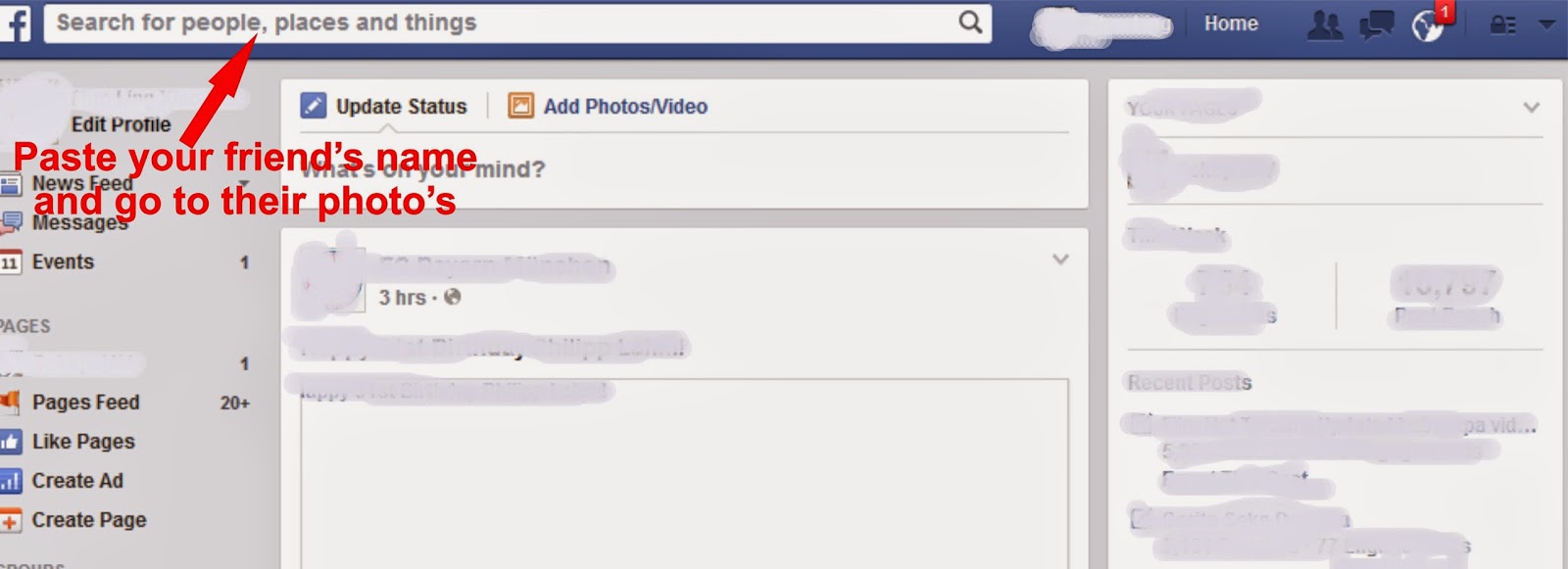
Hope you can bypass the security and unlock you facebook account. if you want to read another
article from penivagi, we like to serve for you.

passing a security check on facebook or locked account. there are several ways that facebook will
provide to confirm your identity, usually by entering a phone number, license ID from government or
confirm your friends name to pass a security on facebook.
1. If facebook request a phone number, this step is very easy just give a phone number and wait for
six code from facebook and after your submit then facebook will unlock your facebook account.
2. If facebook request a license ID, scan your license and submit to facebook. and facebook will
review and send an email to you, after 2 - 3 days open your email.
3. Confirm your friends name, if you have problem with this and you dont know how to do.
a. you need a closest friend in facebook or you have been create another account in facebook.
b. log in first to confirm your friends list name, usually there are six name and you may choice one
an image with name.
c. back to point (a) tell your closest friend to log in facebook and to find a name with image
appears in the facebook security.
d. or if you have another facebook account, log in your another facebook account in other browser
dont in the same browser to confirm pass security, one account in firefox and one other in other
browser except firefox, you can use log in from Opera, Flock, or Chrome.
e. last step is copy your friend's name in facebook security and paste their name in your other
account facebook.
Hope you can bypass the security and unlock you facebook account. if you want to read another
article from penivagi, we like to serve for you.
Secret Code NightVenture
Anda ketinggalan menonton film untuk mengetahui kode rahasia (secret code) Nightventure film
yang ditayangkan oleh Global TV. bagi anda yang ketinggalan atau tidak tau apa kode rahasianya
silahkan lihat kodenya dibawah ini beserta film yang ditayangkan di Global TV.
 Kode Rahasia Nightventure film yang ditayangkan pada Global TV dan RCTI
Judul Film : Body of Lies
Secret Code : CIA
Judul Film : Red
Secret Code :
akan selalu diupdate untuk Secret Code Nightventure terbaru di Global TV Jika anda tertarik ingin
mengikuti kuis dari nightventure ini, dapat anda ikuti kuisnya di nightventure.
jangan sampai ketinggalan untuk menonton film seru dan menarik yang selalu tayang di Global TV
bersama Nightventure dan dapatkan hadiah dengan megikuti kuis nightventure. jika anda ingin
membaca kumpulan artikel menarik dari kami, silahkan anda baca pada artikel selanjutnya dibawah
ini semoga artikel ini bermanfaat bagi anda.

yang ditayangkan oleh Global TV. bagi anda yang ketinggalan atau tidak tau apa kode rahasianya
silahkan lihat kodenya dibawah ini beserta film yang ditayangkan di Global TV.
Judul Film : Body of Lies
Secret Code : CIA
Judul Film : Red
Secret Code :
akan selalu diupdate untuk Secret Code Nightventure terbaru di Global TV Jika anda tertarik ingin
mengikuti kuis dari nightventure ini, dapat anda ikuti kuisnya di nightventure.
jangan sampai ketinggalan untuk menonton film seru dan menarik yang selalu tayang di Global TV
bersama Nightventure dan dapatkan hadiah dengan megikuti kuis nightventure. jika anda ingin
membaca kumpulan artikel menarik dari kami, silahkan anda baca pada artikel selanjutnya dibawah
ini semoga artikel ini bermanfaat bagi anda.
The Walking Dead Full Season
The Walking Dead this is an Serial TV Genre : horror | drama | thriller and so you can look the title
the movies season 1 2 3 4 5. Police officer Rick Grimes leads a group of survivor in the world
over-run by a nightmare they call zombies.
Season 1 :
Days Gone By - Guts - Tell it to the frog - Vatos - Wildfire - TS19
Season 2 :
What lies ahead - Bloodletting - Save the last one - Cheeroke rose - Chupacabra - Secrets - Pretty
much dead already - Nebraska - Triggerfinger - 18 miles out - Judge, jury, executioner - Better
angels - Besides the dying fire
Season 3 :
Seed - Sick - Walk with me - Killer within - Say the word - Hounded - When the dead knocking -
Made to suffer - The suicide king - Home - I aint judas - Clear - Arrow in the doorpost - Prey -
This sorrow life - Welcome to the tombs
Season 4 :
30 Days without an accident - Infected - Isolation - Indifference - Internment - Live bait - Dead
weight - Too far gone - After - Inmates - Claimed - Still - Alone - The groove - Us - A
Season 5 :
No sanctuary - Strangers - Four walls and roof - Slabtown - The Choice - Heart driff - Crossed
Wait for the new title update, comeback anytime to see next update series season. or do you want read
another article in our blogs we loved to serve for you today.

the movies season 1 2 3 4 5. Police officer Rick Grimes leads a group of survivor in the world
over-run by a nightmare they call zombies.
Season 1 :
Days Gone By - Guts - Tell it to the frog - Vatos - Wildfire - TS19
Season 2 :
What lies ahead - Bloodletting - Save the last one - Cheeroke rose - Chupacabra - Secrets - Pretty
much dead already - Nebraska - Triggerfinger - 18 miles out - Judge, jury, executioner - Better
angels - Besides the dying fire
Season 3 :
Seed - Sick - Walk with me - Killer within - Say the word - Hounded - When the dead knocking -
Made to suffer - The suicide king - Home - I aint judas - Clear - Arrow in the doorpost - Prey -
This sorrow life - Welcome to the tombs
Season 4 :
30 Days without an accident - Infected - Isolation - Indifference - Internment - Live bait - Dead
weight - Too far gone - After - Inmates - Claimed - Still - Alone - The groove - Us - A
Season 5 :
No sanctuary - Strangers - Four walls and roof - Slabtown - The Choice - Heart driff - Crossed
Wait for the new title update, comeback anytime to see next update series season. or do you want read
another article in our blogs we loved to serve for you today.
Between Pageview and Unique Visitors
a different between pageview and a unique visitors? and why pageview visitors different with unique
visitors. how to calculate a unique visitor in your blog sites, and whether a unique visitors are
important for blog sites? the answer is yes, a unique visitors iwhen visit your blog sites it will
calculated for 1 IP, if another IP visit your blog sites again you got 2 unique visitors.
a. unique visitors is a number from single IP in a specified periode of times, the high number of
unique visitors is the success of your blog sites to show up in the first search result in any browser,
such like google, yahoo, etc. one unique visitors who visited your blog site several times will only be
counted once.
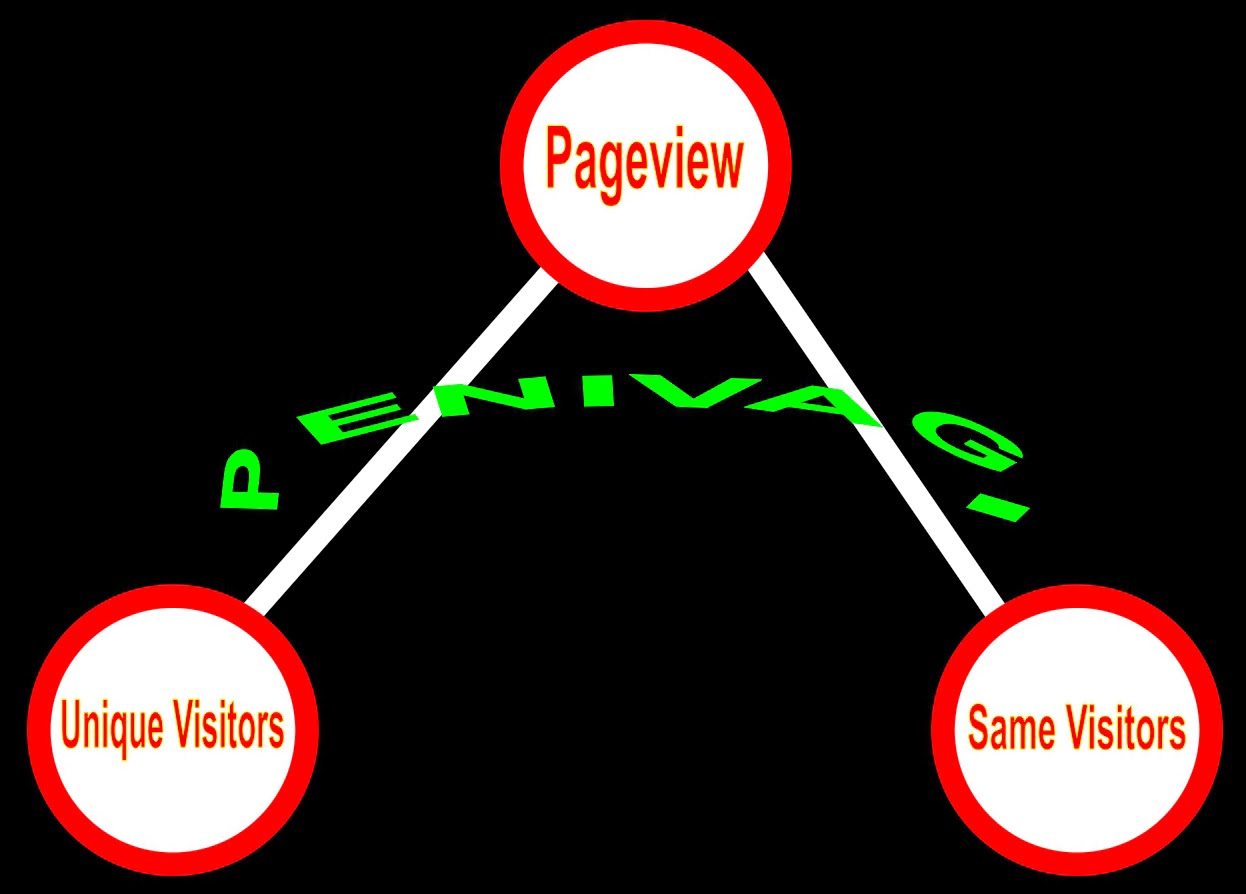 b. visitors is who visited your blog sites but different with unique visitors, these statistic will show
the total number of visitors pageview. so the visitors address can be counted several times as many
visited to your blog sites it will be conducted.
c. what is pageview? pageview is a page that is being viewed by the visitors, a one visitors in your
blog site open your page will be calculated 1 pageview and open othe page will counted as 2
pageview.
visitors. how to calculate a unique visitor in your blog sites, and whether a unique visitors are
important for blog sites? the answer is yes, a unique visitors iwhen visit your blog sites it will
calculated for 1 IP, if another IP visit your blog sites again you got 2 unique visitors.
a. unique visitors is a number from single IP in a specified periode of times, the high number of
unique visitors is the success of your blog sites to show up in the first search result in any browser,
such like google, yahoo, etc. one unique visitors who visited your blog site several times will only be
counted once.
the total number of visitors pageview. so the visitors address can be counted several times as many
visited to your blog sites it will be conducted.
c. what is pageview? pageview is a page that is being viewed by the visitors, a one visitors in your
blog site open your page will be calculated 1 pageview and open othe page will counted as 2
pageview.
that all three things are very helpful in increasing your blog sites becomes popular and google search
engine will serve to other people who looking a relevant content or helpful content will show up in
the first search engine and other search engine will do same like that. if you want to read another
article from penivagi, we like to serve for you, the next article is about how to pass facebook security.

article from penivagi, we like to serve for you, the next article is about how to pass facebook security.
Between PageRank and Visitors Stat
a little secret behind pagerank and visitors stat in your blog, are you still thinking about pagerank?
forget that, pagerank come from algorithm but visitors? what will you write keyword or looking for
in the google search engine? google said about a relevant content not about pagerank, google will
serve to people a relevant content or looking for, to show in the search engine result. this is not about
pagerank, but a relevant content make visitors love to come in your blog site. I am not a pro in seo,
I am love to write what I know to share my opinion with other.
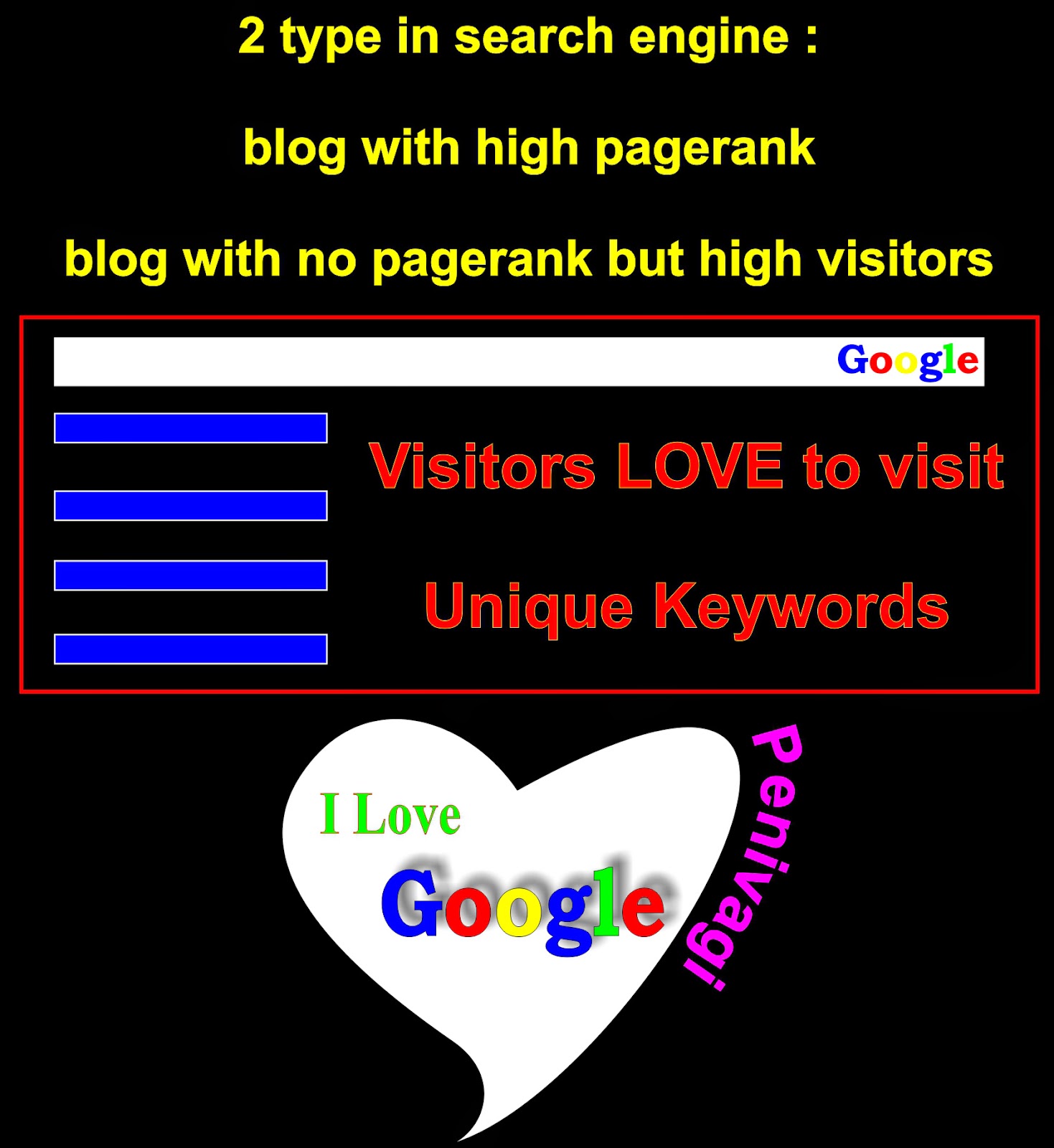 even you dont have pagerank in your blog site, dont to much have obsessed with pagerank. let it
flow with your visitors and always make visitors love your blog site, the very important is visitors.
pagerank just help your blog to show up in the first search result. do not disappointed a loyal visitors
that always come to your blog site even your blog site dont have pagerank.
even if you dont have a blog pagerank, but the pride of visitors come to your blog is a pride for you.
if you want to read another article you may like to read between pageview and unique visitors.

forget that, pagerank come from algorithm but visitors? what will you write keyword or looking for
in the google search engine? google said about a relevant content not about pagerank, google will
serve to people a relevant content or looking for, to show in the search engine result. this is not about
pagerank, but a relevant content make visitors love to come in your blog site. I am not a pro in seo,
I am love to write what I know to share my opinion with other.
flow with your visitors and always make visitors love your blog site, the very important is visitors.
pagerank just help your blog to show up in the first search result. do not disappointed a loyal visitors
that always come to your blog site even your blog site dont have pagerank.
even if you dont have a blog pagerank, but the pride of visitors come to your blog is a pride for you.
if you want to read another article you may like to read between pageview and unique visitors.
How to Download Video from FB
How to download a video from facebook and save the videos this is very simple but maybe some
people dont know how to download and save a video from facebook. to download a video there are
several things you must to do. remember before download a video in facebook make sure you know
the url of the video from fb, and then follow this step to download you favorite videos :
1. find the url of the video in facebook.
example : www.howtodownloadvideo/fromfacebookvideo.com
2. after you find the url, change the www into m.
example : www.howtodownloadvideo.com/fromfacebookvideo change www into m
example : m.howtodownloadvideo.com/fromfacebookvideo then you will see that image
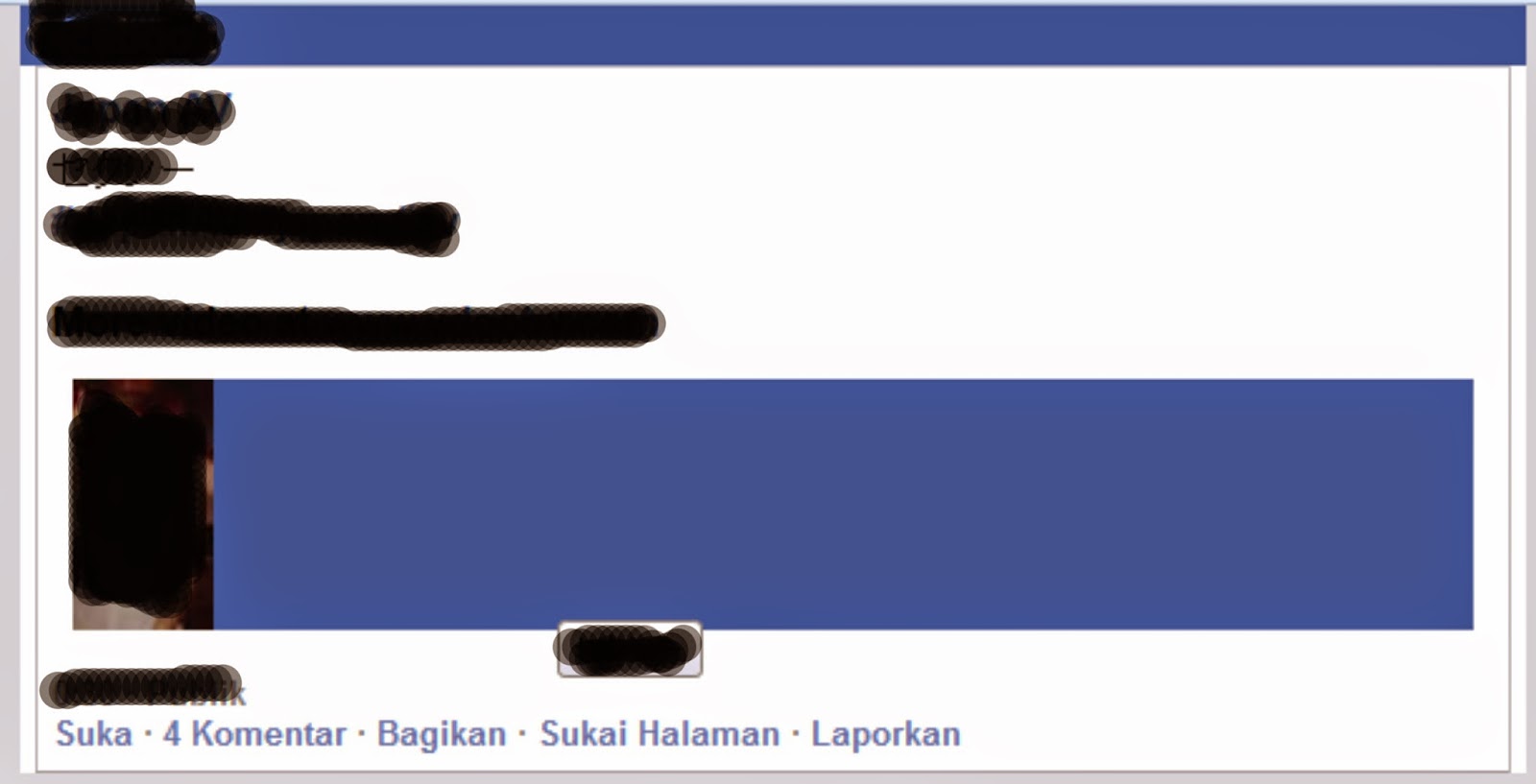 3. and then go to the video and save the video.
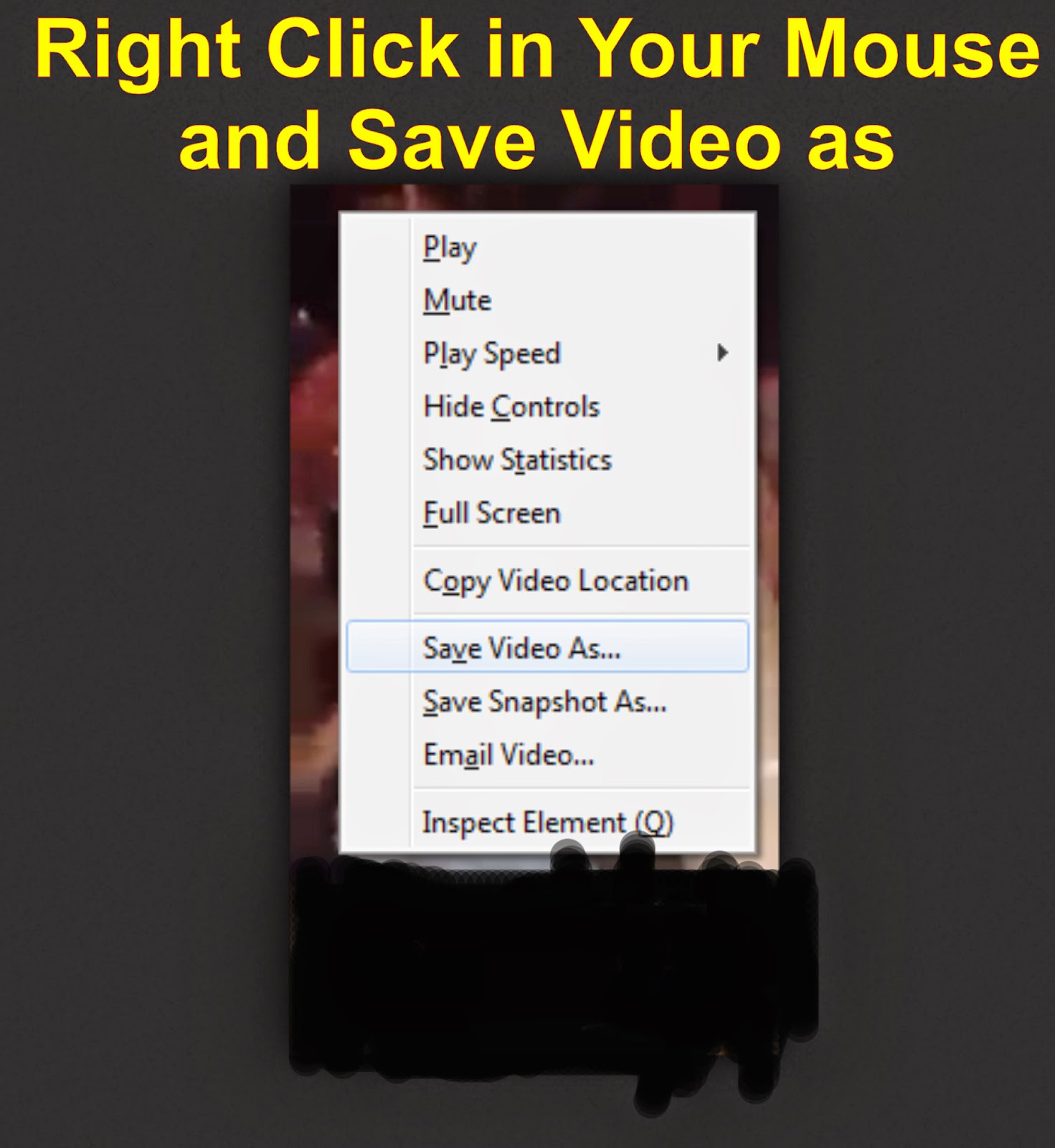 you can download many video from facebook if you follow these step, sorry for blur in the image.
I know exactly what in your think about that image. but it is just an example to download a video,
other than that thank you to visit penivagi.
in the next article you may interest to read about how to use proxy, what is proxy and are the proxy is
useful to use in the internet. you will know the answer dont miss it here we go.

people dont know how to download and save a video from facebook. to download a video there are
several things you must to do. remember before download a video in facebook make sure you know
the url of the video from fb, and then follow this step to download you favorite videos :
1. find the url of the video in facebook.
example : www.howtodownloadvideo/fromfacebookvideo.com
2. after you find the url, change the www into m.
example : www.howtodownloadvideo.com/fromfacebookvideo change www into m
example : m.howtodownloadvideo.com/fromfacebookvideo then you will see that image
I know exactly what in your think about that image. but it is just an example to download a video,
other than that thank you to visit penivagi.
in the next article you may interest to read about how to use proxy, what is proxy and are the proxy is
useful to use in the internet. you will know the answer dont miss it here we go.
How to Get in The First Page of Google
This is very important to make a blog show up in the first page of google search engine, then you
must find a good keyword that make google love it to crawl and make google give the url show in
first page. there are several progress you can do to show your title of the page sites and also url of
your blog sites show in the first page. how to get it? find a relevant keyword this is very important,
example : Looking for boyfriend if this is your keyword, you can use meta to make that keyword.
<meta name="Title of your page" content="description of the pages">
to make the meta tag there you must find code <head> and submit meta tag under the <head> and
you are done. to make your blog site get in the first page of google very fast is simple.
 1. do not use keyword that are high competitor.
2. in the google search look at the top of page 1 of about 6,500 results (0,23 seconds), do not make a
keyword with full of competitor page 1 of about 12,000,000 results.
okay you understand about it, before create a keyword to get the first page in google search. then you
must looking first the keyword results in google search engine. the next article is how to access a
blocked site and why people love to visit that site.

must find a good keyword that make google love it to crawl and make google give the url show in
first page. there are several progress you can do to show your title of the page sites and also url of
your blog sites show in the first page. how to get it? find a relevant keyword this is very important,
example : Looking for boyfriend if this is your keyword, you can use meta to make that keyword.
<meta name="Title of your page" content="description of the pages">
to make the meta tag there you must find code <head> and submit meta tag under the <head> and
you are done. to make your blog site get in the first page of google very fast is simple.
2. in the google search look at the top of page 1 of about 6,500 results (0,23 seconds), do not make a
keyword with full of competitor page 1 of about 12,000,000 results.
okay you understand about it, before create a keyword to get the first page in google search. then you
must looking first the keyword results in google search engine. the next article is how to access a
blocked site and why people love to visit that site.
How to Open Blocked Site
To open blocked sites there are several things you can do and make that blocked sites get open.
where do you must start to begin read this article how to open blocked sites with proxy there is a
reason why proxy is important for access a blocked site. what is proxy? a proxy or proxy server is a
computer system that will act as intermediary for request from client seeking resources from other
servers. proxy server maybe reside in the user computer or in various point between user and the
destination servers on the internet.
 if you are using proxy you maybe can do anything go to other website.
1. You can go to a sites with content filtering.
2. Bypass filter and censorship of other website.
3. Improve a connection into anonymous and high anonymous.
if you dont know how to use proxy, you can use dns :
in the TCP/IPv4 Properties, poin to use the following dns server addresses :
in the preferred DNS server : 8.8.8.8 change to,
Alternate DNS server : 8.8.4.4
after all necessary is done, now try to open blocked site.
recommended for you to learn using proxy and open a blocked sites with it. after you read about
article you will know how to use proxy now. the next article is to make in the first page of google.

where do you must start to begin read this article how to open blocked sites with proxy there is a
reason why proxy is important for access a blocked site. what is proxy? a proxy or proxy server is a
computer system that will act as intermediary for request from client seeking resources from other
servers. proxy server maybe reside in the user computer or in various point between user and the
destination servers on the internet.
1. You can go to a sites with content filtering.
2. Bypass filter and censorship of other website.
3. Improve a connection into anonymous and high anonymous.
if you dont know how to use proxy, you can use dns :
in the TCP/IPv4 Properties, poin to use the following dns server addresses :
in the preferred DNS server : 8.8.8.8 change to,
Alternate DNS server : 8.8.4.4
after all necessary is done, now try to open blocked site.
recommended for you to learn using proxy and open a blocked sites with it. after you read about
article you will know how to use proxy now. the next article is to make in the first page of google.
How to Unblock Internet Filtering
Before access a sites with blocked content you must first bypass these site to get full access into a
sites. why internet in the filtering this is means these sites not friendly and also in filter, there are
several reason you must know why these site get block. the content of that sites is violation and you
may not go into these sites. I dont know about it but I can help you how to bypass and unblock it is
that you want. lets read the article 2 Tips how to unblock site with proxy
 after read the article you can try that tips with yourself, I am sure you can follow the tips and access
the sites with no internet filter anymore. in penivagi everything gonna be simple to solve your online
problem with tips and trick from penivagi. internet filtering is an internet that filter any content in a
site that is considered dangerous and very less interest to be use for user that want go to that site.
users in the internet can only access internet in safemode or healthy site, a site in filter mode have a
bad content or another several reason that maybe I dont know. there are things related to the internet
filtering and dns server, what is DNS server? dns server act as a bridge between client client and the
other computer with the functions of the dns server so that it can be used as a means for filtering or
blocking certain content on the internet.
there are several ways you can do to unblock internet filtering :
a. web proxy
web proxy is online service in which to open blocked sites through the site, there are a lot of many
proxy website available. and also there are even some sites blocked by the internet provider.
b. IP Proxy
you can use IP proxy list from several website that serve a list of proxy you can use.
c. DNS
domain name system maybe this is the problem, you can change your dns in your laptop or computer
after you change your dns, now test to open a blocked site.
read the next article about how to open blocked site with a simple trick and tips from penivagi dont
miss it today.

sites. why internet in the filtering this is means these sites not friendly and also in filter, there are
several reason you must know why these site get block. the content of that sites is violation and you
may not go into these sites. I dont know about it but I can help you how to bypass and unblock it is
that you want. lets read the article 2 Tips how to unblock site with proxy
the sites with no internet filter anymore. in penivagi everything gonna be simple to solve your online
problem with tips and trick from penivagi. internet filtering is an internet that filter any content in a
site that is considered dangerous and very less interest to be use for user that want go to that site.
users in the internet can only access internet in safemode or healthy site, a site in filter mode have a
bad content or another several reason that maybe I dont know. there are things related to the internet
filtering and dns server, what is DNS server? dns server act as a bridge between client client and the
other computer with the functions of the dns server so that it can be used as a means for filtering or
blocking certain content on the internet.
there are several ways you can do to unblock internet filtering :
a. web proxy
web proxy is online service in which to open blocked sites through the site, there are a lot of many
proxy website available. and also there are even some sites blocked by the internet provider.
b. IP Proxy
you can use IP proxy list from several website that serve a list of proxy you can use.
c. DNS
domain name system maybe this is the problem, you can change your dns in your laptop or computer
after you change your dns, now test to open a blocked site.
read the next article about how to open blocked site with a simple trick and tips from penivagi dont
miss it today.
Unblock Internet Positif
Getting blocked with internet positif or nawala it make me think hard how to unblock that site with
connection from speedy. what exactly I must to do when visit site it's show internet positif and I can
not access that site. in many cases there is a tips for you to access a blocked site with nawala
unblocker but before using nawala make sure you use mozilla firefox. this is why mozilla firefox I
love to use as my primary browsing, there are several tools can help me without being risk to get
disappointed they give what I want and what I need no charge to use this browsing. okay, you must
 download first nawala unblocker and read the tutorial how to use nawala. you can get from this
Nawala Unblocker other than that you can use proxy to unblock many site you want to visit. there
are several different about nawala and using proxy, what is nawala? dns nawala perform screen
system negative in a sites that are not in accordance with the norms of decency, other than that its
function the dns nawala sites also filter out harmful and violated the rules and the regulations
between such fraudulent sites, malware and phishing. to unblock internet positif or nawala you must
use nawala unblocker in addition to get into sites that you wanting. the purpose of the internet
positive is to build a positive culture in the world of internet, so the internet is used will become
more familiar and far away from all things about negative.
read article about How to Use Proxy in that article you will get a fast simple to make change in your
proxy and I make sure you can do it with yourself. after you change all the necessary and then go to
access a site that you loved. the next tips is how to make active links in comments.

connection from speedy. what exactly I must to do when visit site it's show internet positif and I can
not access that site. in many cases there is a tips for you to access a blocked site with nawala
unblocker but before using nawala make sure you use mozilla firefox. this is why mozilla firefox I
love to use as my primary browsing, there are several tools can help me without being risk to get
disappointed they give what I want and what I need no charge to use this browsing. okay, you must
Nawala Unblocker other than that you can use proxy to unblock many site you want to visit. there
are several different about nawala and using proxy, what is nawala? dns nawala perform screen
system negative in a sites that are not in accordance with the norms of decency, other than that its
function the dns nawala sites also filter out harmful and violated the rules and the regulations
between such fraudulent sites, malware and phishing. to unblock internet positif or nawala you must
use nawala unblocker in addition to get into sites that you wanting. the purpose of the internet
positive is to build a positive culture in the world of internet, so the internet is used will become
more familiar and far away from all things about negative.
read article about How to Use Proxy in that article you will get a fast simple to make change in your
proxy and I make sure you can do it with yourself. after you change all the necessary and then go to
access a site that you loved. the next tips is how to make active links in comments.
How to Make Sitemap on Blogger
Submit your own blog site and wordpress to google webmaster and how to add sitemap for blog site.
to create a sitemap it is simple and easy, but there are several ways to add sitemap. you can use ctrlq
sitemap or atom sitemap for blog site and then what is sitemap and is that useful for blog? yes it is, it
will help to improve a blog site in a meta tags for any title of your post. if you submit sitemap
webmaster will get crawl more fast to get indexed in google search result.
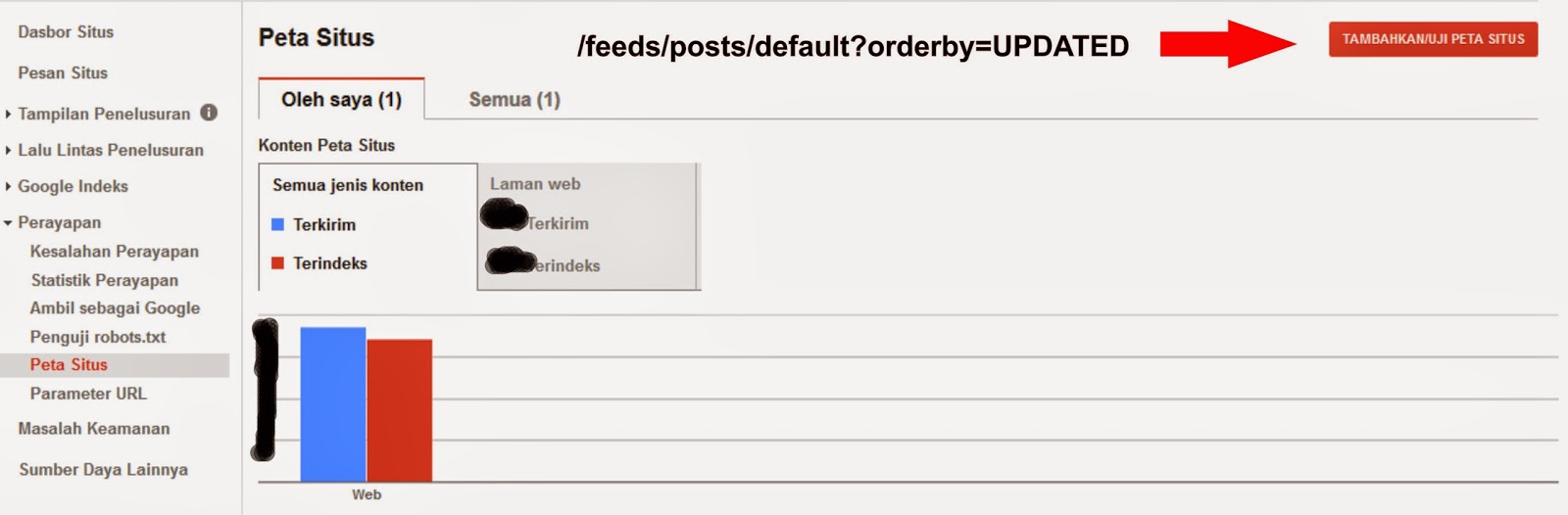 after you see that image, step by step add sitemap for blog site.
1. go to google webmaster.
2. choose what blog site do you want add sitemap.
3. go to crawl and go to sitemap.
4. add this atom sitemap " /feeds/posts/default?orderby=UPDATED " and submit to sitemap.
if your post is more than 26 post, you will not see an update sitemap, how to resolve that.
you can submit this sitemap :
User-agent: *
Disallow: /search
Allow: /
Sitemap: http://penivagi.blogspot.com/atom.xml?redirect=false&start-index=1&max-results=500
these underline means your post will update more than 26 post of your blog, submit underline text
into your new sitemap in webmaster. or you can add the sitemap into robots.txt in your blog sites
change http://penivagi.blogspot.com with your blog sites url, I got this sitemap from ctrlq.
finally you have your sitemap and it will automatically update when you create another post in
your blog site and will get indexed in google webmaster. read the next article about unblock site.

to create a sitemap it is simple and easy, but there are several ways to add sitemap. you can use ctrlq
sitemap or atom sitemap for blog site and then what is sitemap and is that useful for blog? yes it is, it
will help to improve a blog site in a meta tags for any title of your post. if you submit sitemap
webmaster will get crawl more fast to get indexed in google search result.
1. go to google webmaster.
2. choose what blog site do you want add sitemap.
3. go to crawl and go to sitemap.
4. add this atom sitemap " /feeds/posts/default?orderby=UPDATED " and submit to sitemap.
if your post is more than 26 post, you will not see an update sitemap, how to resolve that.
you can submit this sitemap :
User-agent: *
Disallow: /search
Allow: /
Sitemap: http://penivagi.blogspot.com/atom.xml?redirect=false&start-index=1&max-results=500
these underline means your post will update more than 26 post of your blog, submit underline text
into your new sitemap in webmaster. or you can add the sitemap into robots.txt in your blog sites
change http://penivagi.blogspot.com with your blog sites url, I got this sitemap from ctrlq.
finally you have your sitemap and it will automatically update when you create another post in
your blog site and will get indexed in google webmaster. read the next article about unblock site.
How to Make Script For Online Games
This tutorial how to make auto script for online games and beat the games. there are several auto
script program you can use to make your character auto in a games. almost like auto use potion auto
use skill and many more you can do with that program. in this article I want to share you how to use
and make the script bot work for you. then you must download the script program first to start.
1. Autohotkey this is a program you need to using a script.
2. AutoIt this is a program same like as below.

You see that image, before you using a script make sure you rewrite that script in the notepad.
1. #Notrayicon is means icon script will not shown in desktop.
2. #SingleInstance is means no other script allow and will shutdown your first script.
3. MsgBox is means when you will start a script will show message box.
4. F4:: is means when you click F4 in your keyboard it will start the program with your command.
5. Setkeydelay is means delay to click to another key move command, 500 is 5 second, 1000 is 10
second, 12000 is 12 second.
6. Send is means a command to click.
7. Sleep is means set delay time to click.
8. ExitApp is means exit program.
9. Pause is means pause/start using script.
you can read full tutorial from autohotkey and autoit to make your script more better. to make the
script work you must right click and run as administrator. you may also read how to make sitelinks in
google and get more link show up in google search, read the next article how to get sitelinks.

script program you can use to make your character auto in a games. almost like auto use potion auto
use skill and many more you can do with that program. in this article I want to share you how to use
and make the script bot work for you. then you must download the script program first to start.
1. Autohotkey this is a program you need to using a script.
2. AutoIt this is a program same like as below.
You see that image, before you using a script make sure you rewrite that script in the notepad.
1. #Notrayicon is means icon script will not shown in desktop.
2. #SingleInstance is means no other script allow and will shutdown your first script.
3. MsgBox is means when you will start a script will show message box.
4. F4:: is means when you click F4 in your keyboard it will start the program with your command.
5. Setkeydelay is means delay to click to another key move command, 500 is 5 second, 1000 is 10
second, 12000 is 12 second.
6. Send is means a command to click.
7. Sleep is means set delay time to click.
8. ExitApp is means exit program.
9. Pause is means pause/start using script.
you can read full tutorial from autohotkey and autoit to make your script more better. to make the
script work you must right click and run as administrator. you may also read how to make sitelinks in
google and get more link show up in google search, read the next article how to get sitelinks.
When Google Give a PageRank
No one know when google will give a blog site wordpress pagerank and so am I, this pagerank
affect for blog site as result your link will show up at the top of google search engine. it is very
important to get pagerank for your blog site and wordpress because if you get this ranks a lot of
visitors will come to your blog links. there are many reason google will give pagerank :
1. Relevant content is the main priority.
2. Have a more backlinks because your blog site is very helpful for visitors.
3. Google algorithm this is the main reason to get pageranks.
 maybe there are a lot of reason that google will choose your blog site to get pagerank. in many cases
what is exactly google algorithm, the founder of google algorithm is larry page and sergey brin. in
the approache that have been describe in the article pagerank algorithm as below.
the first algorithm
PR (A) = (1-D) + D { (PR(T1) / C(T1) + . . . + PR(TN) / C(TN) }
PR (A) it is pagerank, PR(T1) it is pagerank from T1 to PR (A), C it is an outbound link from T1,
and D it is factor between give 0 and 1.
the algortihm can be seen in that pagerank determine for each of page site it is not the whole site.
pageranks determine from pages that refer to links which also process the pagerank in the same way.
then finally this process will be repeated until the right result. after all about pagerank and
everythings about it need a process, read the next article about using nofollow in a blog site.

affect for blog site as result your link will show up at the top of google search engine. it is very
important to get pagerank for your blog site and wordpress because if you get this ranks a lot of
visitors will come to your blog links. there are many reason google will give pagerank :
1. Relevant content is the main priority.
2. Have a more backlinks because your blog site is very helpful for visitors.
3. Google algorithm this is the main reason to get pageranks.
what is exactly google algorithm, the founder of google algorithm is larry page and sergey brin. in
the approache that have been describe in the article pagerank algorithm as below.
the first algorithm
PR (A) = (1-D) + D { (PR(T1) / C(T1) + . . . + PR(TN) / C(TN) }
PR (A) it is pagerank, PR(T1) it is pagerank from T1 to PR (A), C it is an outbound link from T1,
and D it is factor between give 0 and 1.
the algortihm can be seen in that pagerank determine for each of page site it is not the whole site.
pageranks determine from pages that refer to links which also process the pagerank in the same way.
then finally this process will be repeated until the right result. after all about pagerank and
everythings about it need a process, read the next article about using nofollow in a blog site.
How to Make SiteLinks
There are 4 Step to make create SiteLinks to show in google search engine for your Blog. actually
there are several requirement in order to get the sitelinks appears. in google webmaster sitelinks are
automatically generated links, which can appear in the search results of your site, if you do not want
to appear as a links site pages you can demote. this means (remove demote), okay to make sitelinks
you must go to google webmaster and demote to appear sitelinks and remove demote to remove
sitelinks appear in search result. sitelinks is very helpful for visitors to accelerate or shorten the
search for an article in the page they want to read or see, with sitelinks then visitors will be pleased
to shorten their time in searching for a page that is very relevant and helpful as you can see this
sitelinks image in search result.
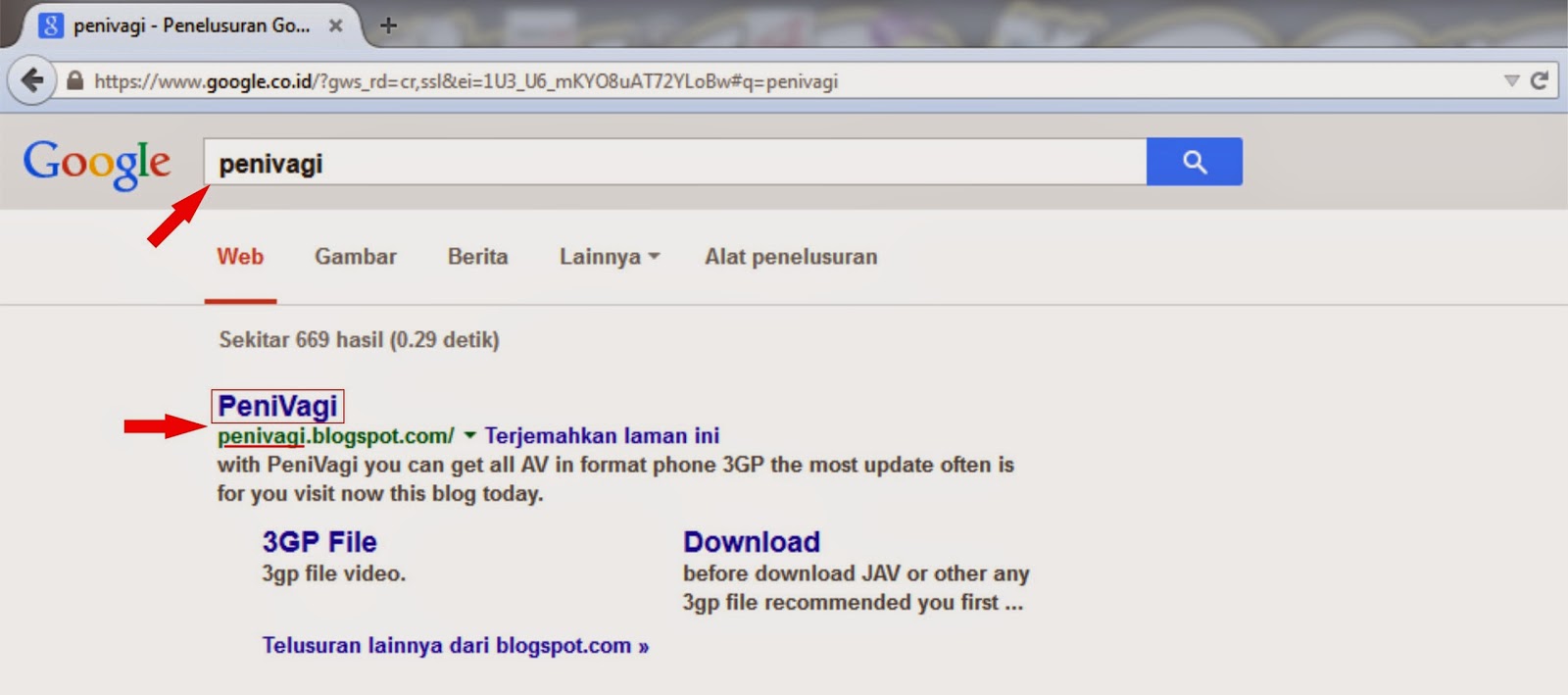
If Penivagi can make sitelinks and so you are :
1. Link and Title must be same.
2. After that submit your blog site to webmaster and link to google analytics.
3. Your Blog Site need a lot of visitors to get SiteLinks.
4. Read from Google Webmaster https://support.google.com/webmasters/answer/47334?hl=en
the important if your blog sites have sitelinks :
a. When people search for your keyword in google search result they will choose what link is very
important and helpful to reduce time find another keyword.
b. Your blog sites will be higher value in the eyes of visitors.
c. certainly be an honor for you.
If you follow this step 1 2 and 3, you will get sitelinks in google search but your title must show at
the top of google search engine to get fast a sitelinks for your blog site or wordpress.
now Google update a new search box sitelinks, how to make sitelinks search box? The sitelinks
search box appears only for navigational queries and when relevant for users. Google algorithms use
a variety of factors to determine when the box appears, including the information on the site and
different types of navigational queries from Search users. you can find your answer from :
https://developers.google.com/webmasters/richsnippets/sitelinkssearch
How to make your blog or site get indexed and get PR (PageRank) in google search. Penivagi will
reveal the secrets to get PR for your blog and get more visitors to your blog site, the next article How
to Get PageRank.
there are several requirement in order to get the sitelinks appears. in google webmaster sitelinks are
automatically generated links, which can appear in the search results of your site, if you do not want
to appear as a links site pages you can demote. this means (remove demote), okay to make sitelinks
you must go to google webmaster and demote to appear sitelinks and remove demote to remove
sitelinks appear in search result. sitelinks is very helpful for visitors to accelerate or shorten the
search for an article in the page they want to read or see, with sitelinks then visitors will be pleased
to shorten their time in searching for a page that is very relevant and helpful as you can see this
sitelinks image in search result.
If Penivagi can make sitelinks and so you are :
1. Link and Title must be same.
2. After that submit your blog site to webmaster and link to google analytics.
3. Your Blog Site need a lot of visitors to get SiteLinks.
4. Read from Google Webmaster https://support.google.com/webmasters/answer/47334?hl=en
the important if your blog sites have sitelinks :
a. When people search for your keyword in google search result they will choose what link is very
important and helpful to reduce time find another keyword.
b. Your blog sites will be higher value in the eyes of visitors.
c. certainly be an honor for you.
If you follow this step 1 2 and 3, you will get sitelinks in google search but your title must show at
the top of google search engine to get fast a sitelinks for your blog site or wordpress.
now Google update a new search box sitelinks, how to make sitelinks search box? The sitelinks
search box appears only for navigational queries and when relevant for users. Google algorithms use
a variety of factors to determine when the box appears, including the information on the site and
different types of navigational queries from Search users. you can find your answer from :
https://developers.google.com/webmasters/richsnippets/sitelinkssearch
How to make your blog or site get indexed and get PR (PageRank) in google search. Penivagi will
reveal the secrets to get PR for your blog and get more visitors to your blog site, the next article How
to Get PageRank.

Custom Search